

By James Pointon, Founding Director of Higher Performance.
You redesign a website without losing SEO by keeping everything Google already trusts about the old site. In practice, good website redesign SEO means redirecting every changed URL to its new equivalent with a 301 redirect and carrying over the content and metadata that earn your current rankings. Handled this way, a redesign becomes the point where your rankings improve rather than the moment they collapse.
Does a website redesign affect SEO?
Yes. Any change to your URLs, content or site structure changes the signals Google uses to rank you.
A short period of fluctuation after launch is normal while Google recrawls the site. Large, lasting drops are a different matter, and they almost always come from avoidable mistakes made during the build rather than from the redesign itself.
Why do rankings drop after a website redesign?
Rankings usually fall when pages Google knows about disappear without a redirect, or when the content that earned those rankings is cut or rewritten beyond recognition. If your traffic has already fallen, our guide to why website traffic drops covers the wider causes.
The most common redesign mistakes are:
- Changed URLs with no redirects. Old pages return 404 errors, and the authority built up by their backlinks is lost. Google’s documentation on redirects explains why a permanent 301 redirect is the right signal.
- Removed or thinned content. Pages that ranked are merged, shortened or dropped in the name of a cleaner design.
- Lost title tags and meta descriptions. These are often left blank or replaced with generic text when a site moves platform.
- A noindex tag left on from staging. A noindex rule tells Google to drop pages from its results, and one left on sitewide removes the entire website.
- Broken internal linking. New navigation leaves important pages buried or orphaned.
- Missing structured data. Schema that supported rich results and AI Overviews is not rebuilt on the new templates.
- A slower site. Heavy images and bloated themes undo the speed the old site had, and website speed affects your rankings more than most owners realise.
Each of these is preventable with a clear plan.
How do you redesign a website without losing SEO?
Treat SEO as part of the brief from the first day of the project rather than a task for launch week. The work falls into four stages.
Before you build
Start by benchmarking the current site so you can measure the new one against it. Export the last twelve months of clicks, impressions and rankings from Google Search Console, together with traffic and conversions from Google Analytics.
Next, crawl the existing site to produce a full list of URLs. Flag the pages that bring in organic traffic, earn backlinks or generate enquiries, since these are the pages the redesign must protect.
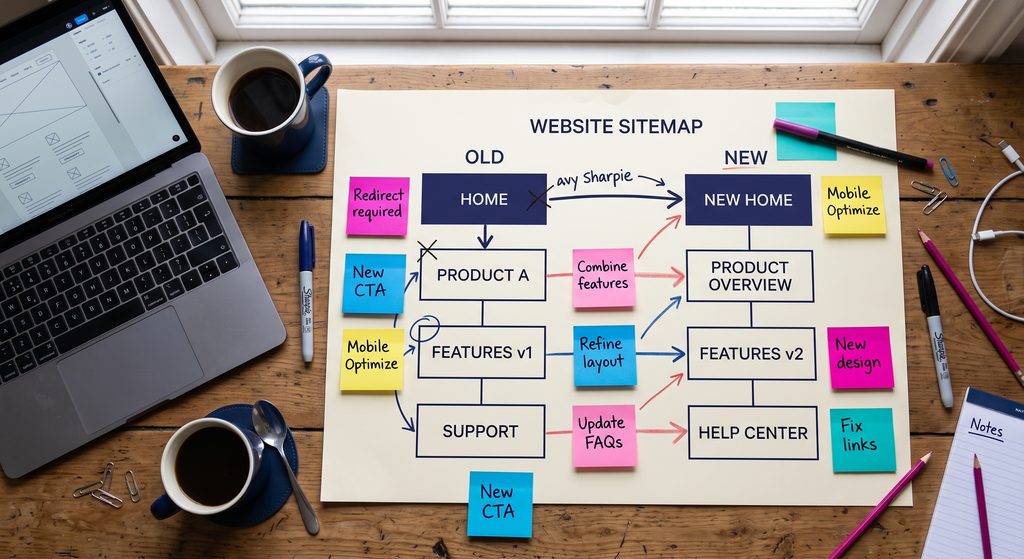
Finally, build a URL map that pairs every old address with its new equivalent. Where a page is being removed, map it to the closest relevant page rather than the homepage.
During the build
Keep existing URLs wherever the new structure allows. An unchanged URL needs no redirect and carries no risk.
Carry over the content, headings, title tags and meta descriptions of every page that ranks. Improve them by all means, but keep the topic and search intent intact.
Rebuild internal links so your most important pages sit no more than a few clicks from the homepage. Recreate structured data on the new templates, which also helps you get found in AI search.
Design for mobile from the outset. Google uses the mobile version of your site for ranking, as its guidance on mobile first indexing sets out, so test every template on a phone and check it against Google’s Core Web Vitals.
The staging site should be password protected and blocked from indexing, so Google never finds a duplicate copy of your website.
At launch
Put every 301 redirect in place the moment the new site goes live. Each old URL should point directly to its final destination in a single hop, with no chains or loops.
Then remove the noindex setting and check that robots.txt is not blocking anything important. Submit the new XML sitemap in Search Console and confirm that analytics and conversion tracking are firing on every form and thank you page.
If the domain itself is changing, follow Google’s guidance on site moves and use the Change of Address tool in Search Console.
After launch
Check Search Console daily for the first fortnight, looking for new 404 errors, indexing problems and crawl anomalies. Fix any redirect gaps immediately.
After that, compare clicks, impressions and rankings weekly against your benchmark. Where a valuable backlink points to an old URL, ask the linking site to update it, as a direct link is stronger than a redirected one.
What have we learned from redesigning client websites?
Higher Performance have redesigned and migrated websites for businesses ranging from a leadership coaching practice in Framlingham to a national interior design brand, moving sites from platforms including Wix onto fast, bespoke WordPress builds. Across those projects, the pattern is consistent: the sites that grow after launch are the ones where SEO shaped the structure before a single page was designed.
The results show what a well planned migration achieves:
- WildKind Interiors saw enquiries rise by 300% within weeks of their redesigned site going live.
- Staging Rooms moved from Wix to a bespoke WordPress build and now ranks first for home staging in Aberdeen, with 126,000 search impressions a year.
- Project Management Blueprint achieved a 14.4% click through rate on its homepage following its rebuild, with an average Google position of 6.4.
“The most expensive mistake I see is a business treating its redesign as a design project and bringing SEO in at the end. By then the URLs have changed, pages have been cut and years of rankings are at risk. We plan the search structure first and design around it, which is why our clients’ sites grow after launch instead of starting again from zero.” James Pointon, Founding Director
What should you keep when redesigning your website?
Keep anything that Google or your customers already value. A redesign should improve the site you have, which is different from starting again with nothing.
In particular, protect:
- Pages that bring in organic traffic, along with their URLs wherever possible
- Pages that earn backlinks from other websites
- Content that converts visitors into enquiries
- Reviews, testimonials and case studies that build trust
- Title tags and meta descriptions that already win clicks
- Location and service pages that rank for local searches
Pages with no traffic, no links and no commercial purpose are the ones worth consolidating or removing, and even those need a redirect.
How long does SEO take to recover after a redesign?
For a well planned redesign of a small or medium sized business website, most pages settle within a few weeks. Google notes that larger sites take longer, since every page has to be recrawled and reprocessed.
If traffic is still well below your benchmark after six to eight weeks, something structural is wrong. The usual culprits are missing redirects, deindexed pages or content that no longer matches what people search for.
Can a website redesign improve your SEO?
Yes, and it should. A redesign is the best opportunity you will have to fix the technical and structural problems that hold a site back, and many of those problems are the reason your website is costing you customers in the first place.
A new build lets you create a clear page structure around the services people search for, with fast loading and mobile usability built in from the start. It is also the moment to add location pages for the areas you serve, whether that is Ipswich, Bury St Edmunds, Cambridge or further afield.
If you are still weighing up platforms, our comparison of website builders and bespoke web design explains where each one helps or limits your SEO.
Website redesign SEO checklist
- Benchmark traffic, rankings and conversions from the last twelve months
- Crawl the current site and list every URL
- Identify pages with traffic, backlinks or conversions
- Build a one to one URL redirect map
- Keep existing URLs wherever possible
- Carry over ranking content, title tags and meta descriptions
- Rebuild internal links and structured data
- Password protect and noindex the staging site
- Test page speed and mobile usability before launch
- Launch 301 redirects in a single hop with no chains
- Remove noindex and check robots.txt
- Submit the new XML sitemap to Google Search Console
- Confirm analytics and conversion tracking work
- Monitor Search Console daily for two weeks, then weekly
- Keep redirects in place for at least a year
Planning a redesign?
Higher Performance build websites in WordPress with SEO planned into the project from the first brief rather than bolted on at the end. Our website redesign services and SEO specialists work as one team, so your new site launches with its rankings protected and room to grow. If you are new to search, our guide to SEO for small businesses is a good place to start.
Let’s talk about your website project.
Frequently asked questions
Will I lose my Google rankings if I redesign my website?
Not if the redesign is planned correctly. Rankings are lost when URLs change without 301 redirects or when ranking content is removed. With a full redirect map and your key content carried over, most sites see only brief fluctuation, and many improve.
Do I need 301 redirects if my URLs stay the same?
No. If a page keeps exactly the same URL, no redirect is needed. However, a move from http to https or a change of domain changes every URL, so each one then needs a redirect.
How long should 301 redirects stay in place?
Keep them for at least a year, and ideally permanently. Google recommends keeping redirects for as long as possible, generally at least a year, so that all ranking signals transfer to the new URLs.
Can I move from Wix or Squarespace to WordPress without losing SEO?
Yes. A platform move follows the same principles as any redesign: map every URL, redirect anything that changes and carry over your ranking content. Moving to a faster, cleaner platform often improves rankings once Google has recrawled the site.
What should I ask a web designer about SEO before a redesign?
Ask how they will map and redirect your existing URLs, and who is responsible for monitoring rankings after launch. A designer who cannot answer both clearly is putting your traffic at risk. Our guide to choosing a digital marketing agency covers the wider questions to ask.
About Higher Performance
Written by James Pointon, Founding Director of Higher Performance.
Higher Performance are a web design and SEO agency serving businesses across Suffolk, Cambridge and the UK. As a certified Google Partner and verified Meta Business Partner, the team have redesigned and migrated websites for clients from Framlingham to Aberdeen. Higher Performance have been featured in Your Business with Deborah Meaden and on the Leadership Lounge and Built to Behave podcasts, and the founders bring decades of experience building and selling businesses of their own.